Every feature, on the record.
What the Pro Workspace does, one feature at a time, each shown in a real recording of the real workspace with a made-up sample case.
Pro is free for now: every Pro tool, no trial, no credit card. On a computer; the phone app saves to it.
Sample case · the real workspace, recorded
What this recording shows
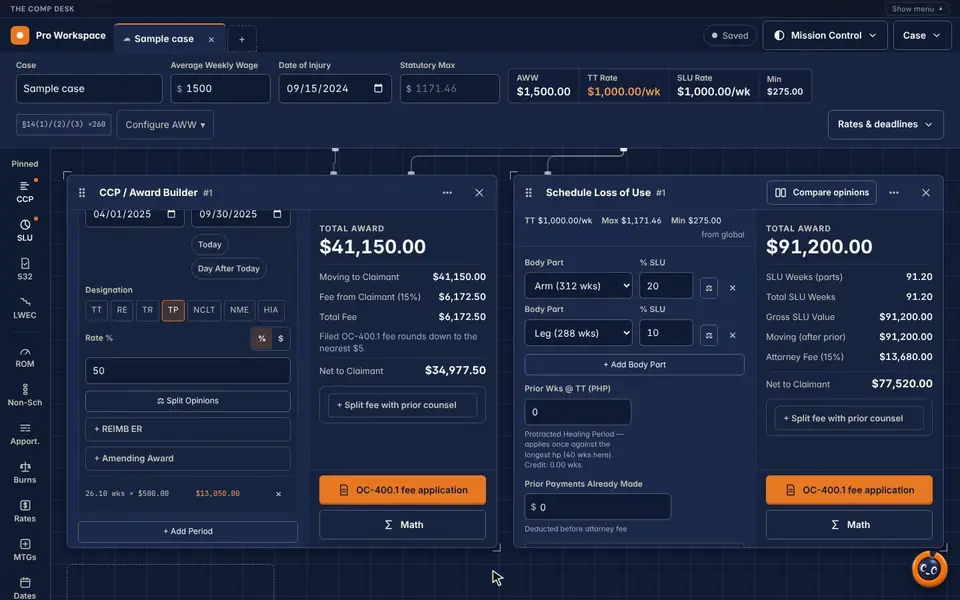
- The sample case opens on the Command Deck: the case strip across the top (wage, date of injury, rates) and the calculator rail on the left.
- CCP / Award Builder and Schedule Loss of Use sit side by side as two large bays, each with its results column on the right.
- Each bay shows its total award, fee, net to claimant and an OC-400.1 fee application button.
CCP and SLU in big bays, everything else in the rail.
The workspace is a twelve-column deck. CCP and SLU open first, as large bays whose results stay in a right-hand column while you work. The rest of the calculators wait in the rail on the left, pinned ones first.
- Case tabs across the top; open several cases at once
- Lines run from the case strip to the tiles that use each value, so you can see what feeds what
- Move, resize or close any tile; CCP and SLU are never shrunk to a small card
- "Open a sample case" to try it with made-up numbers
What this recording shows
- The sample case opens on the Command Deck: the case strip across the top (wage, date of injury, rates) and the calculator rail on the left.
- CCP / Award Builder and Schedule Loss of Use sit side by side as two large bays, each with its results column on the right.
- Each bay shows its total award, fee, net to claimant and an OC-400.1 fee application button.
One wage, one date of injury, every rate.
Enter the average weekly wage and date of injury once. The strip shows the TT rate, the SLU rate and the statutory maximum and minimum for that date, and passes them to the tiles that use them.
- Configure AWW: the wage method and concurrent employment
- Rates & deadlines drawer: common rates from 25% to 100% of the wage, bounded by the date of injury
- Deadline tool: a start date plus a term in days gives the deadline
What this recording shows
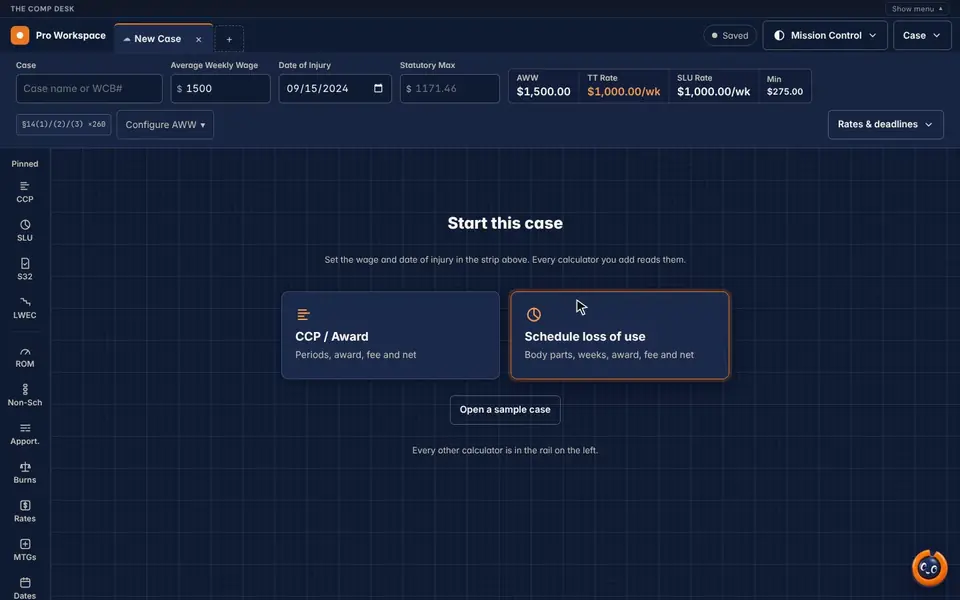
- A new case: the wage is typed into Average Weekly Wage.
- The strip fills in the TT rate, the SLU rate and the minimum for the date of injury.
- The Rates & deadlines drawer opens: common rates as a percentage of the wage, and a deadline counted from a start date.
Build the award period by period.
Stack as many periods as the case needs. Each new period starts where the last one ended.
- Designations per period: TT, RE, TR, TP, NCLT, NME and HIA
- Round weeks to a tenth or a whole week, as the Board's rate sheet does
- Reimbursement to the employer, amending awards and split opinions per period
- Total award, fee and net in a results column that stays in view
A made-up case used to record the demo, not a client result.
Prior results do not guarantee a similar outcome.
What this recording shows
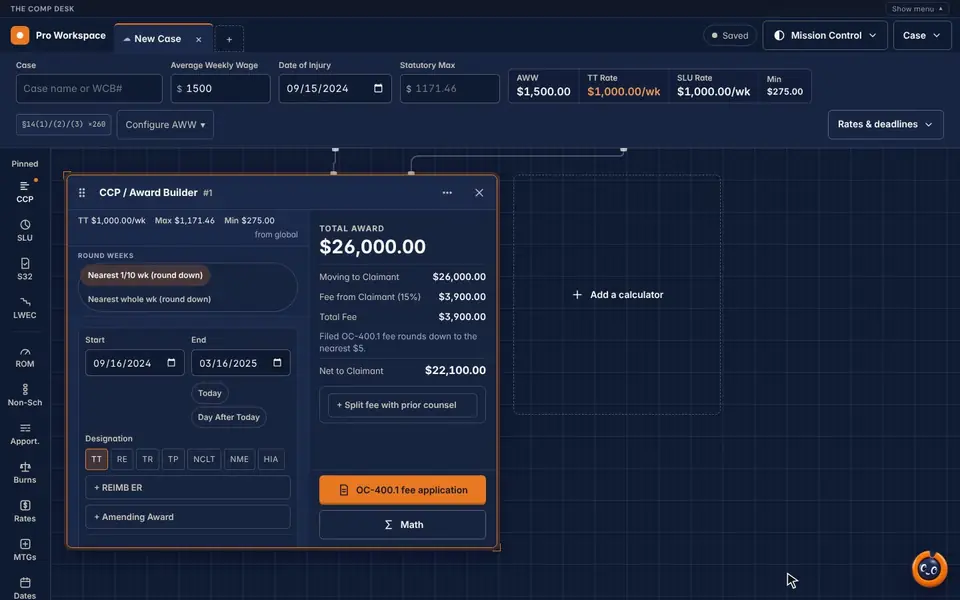
- A CCP / Award Builder tile with one period, September 16, 2024 to March 16, 2025, designated TT.
- Weeks are rounded to the nearest tenth: 26.0 weeks at $1,000 a week.
- The results column shows a $26,000 award, a $3,900 fee (15%) and $22,100 net to the claimant.
Every body part, weeks to net.
Pick each body part (its weeks come with it) and enter the percentage. The tile adds the weeks, prices them at the SLU rate and takes out prior payments before the fee.
- Protracted healing period credit applied once, against the longest
- Prior payments deducted before the attorney fee
- Split the fee with prior counsel
A made-up case used to record the demo, not a client result.
Prior results do not guarantee a similar outcome.
What this recording shows
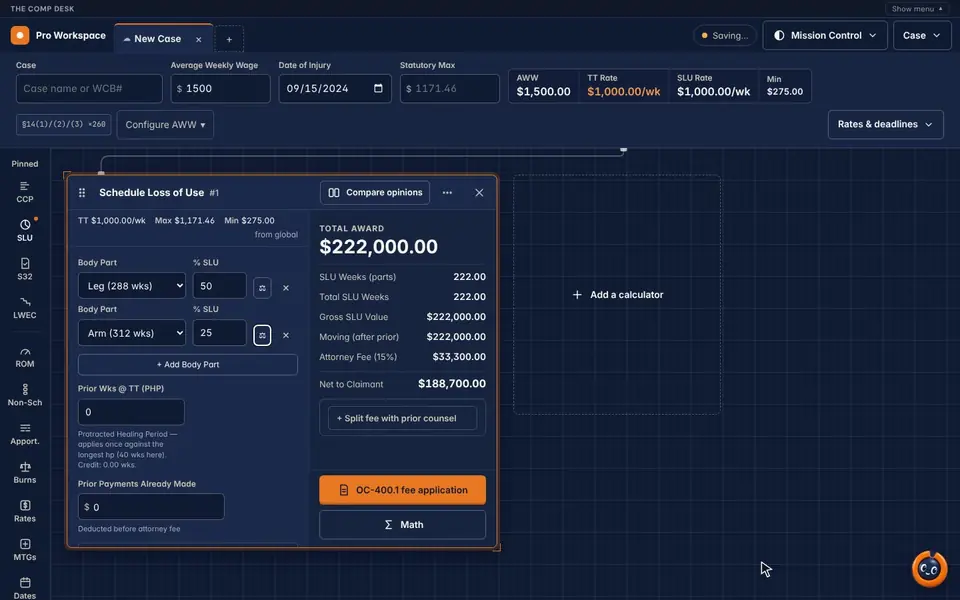
- A Schedule Loss of Use tile: leg at 50% (288 weeks) and arm at 25% (312 weeks).
- 144 plus 78 weeks makes 222 weeks at the $1,000 SLU rate.
- The results column shows $222,000, a $33,300 fee and $188,700 net to the claimant.
IME, treating, and the difference.
On SLU and ROM → SLU tiles, Compare opinions runs the calculation once for each doctor and lines the results up: IME, treating, difference, and an optional straight split at the midpoint.
- One row per intermediate figure: weeks, rate, award, credits, fee, net
- Each column is the same calculation the single-opinion tile makes
A made-up case used to record the demo, not a client result.
Prior results do not guarantee a similar outcome.
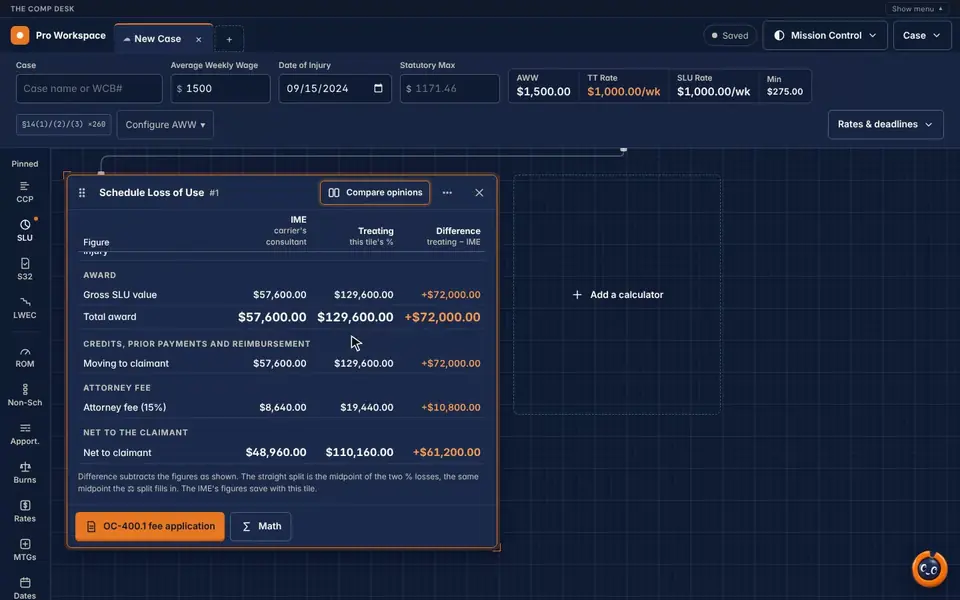
What this recording shows
- Compare opinions opens on the SLU tile: the carrier's consultant (IME) in one column, the treating doctor in the next, the difference in the third.
- IME at 20% gives $57,600; the treating doctor at 45% gives $129,600.
- The difference row shows $72,000, then the fee and net to the claimant under each opinion.
The fee application, from the same numbers.
CCP, SLU, Section 32 and LWEC each carry an OC-400.1 fee application button. The filed fee rounds down to the nearest $5, and with prior counsel it requests the current attorney's share.
OC-400.1 fee application
Filled from the tile you are on, the equation and the fee included.
Math drawer
Open "Math" on a calculator tile to see the equation behind its result.
Formulas and Copy all equations
From the Case menu: every tile's equation in one place, ready to paste.
Prior counsel split
Split a fee with prior counsel on CCP and SLU; the net to the claimant does not change.
The rest of the rail.
Add any of them from the rail. Pinned first: CCP, SLU, Section 32 and LWEC.
Section 32 Settlement
Settlement minus MSA, 15% fee on the remainder, with the OC-400.1.
Loss of Wage-Earning Capacity
Bracket calculation from the wage, with the OC-400.1.
ROM → SLU BETA
Range of motion to a schedule loss under the 2018 Guidelines; has Compare opinions.
Non-Schedule BETA
Spine, brain and psych impairment to class and severity.
Multi-Case SLU / Apportionment
One claimant, several dates of accident, apportioned across cases.
Burns Rate
Third-party lien apportionment per Burns v. Varick.
Rate Lookup
Maximum and minimum rates by date.
Medical Treatment Guidelines
Browse and search the NYS guidelines and their approval criteria.
Date Calculator
Add or subtract years, months, weeks and days, or count the span between two dates.
Save to My Cases, pick it up anywhere.
Name the case and save it from the Case menu. Saved cases sync to your account, and the save chip in the top bar shows when the work is saved. If the same case changed on another device, the workspace asks which version to keep.

Calculate on the phone, finish on the computer.
The Pro Workspace runs on a computer. In The Comp Desk app, "Save to my workspace" sends a calculation to it: it arrives as a saved tab, and while the workspace is open a "From your phone" card shows it live.

Say the numbers. Comp Buddy fills the tiles.
Hold the voice button and say what to enter; the workspace fills in the tiles and answers out loud. Where the browser can recognise speech on the computer itself, a tap keeps it listening for "Hey Comp Buddy", and that listening stays on the computer.

Ten looks, light and dark.
Mission Control (dark, the default) and Daylight (light), plus eight more. Your choice is saved with your workspace.
Try it on tomorrow's hearing.
Sign up in 90 seconds. Pro is free for now, so there's nothing to cancel.