Grounded AI for your Workers’ Compensation practice.
Comp Buddy and the Pro Workspace run every SLU, LWEC and CCP figure through one deterministic calculation engine, answer from an approved knowledge base and case law checked by practicing attorneys and verified before approval, and hand you the fee, the net and the OC-400.1 with the math behind each number.
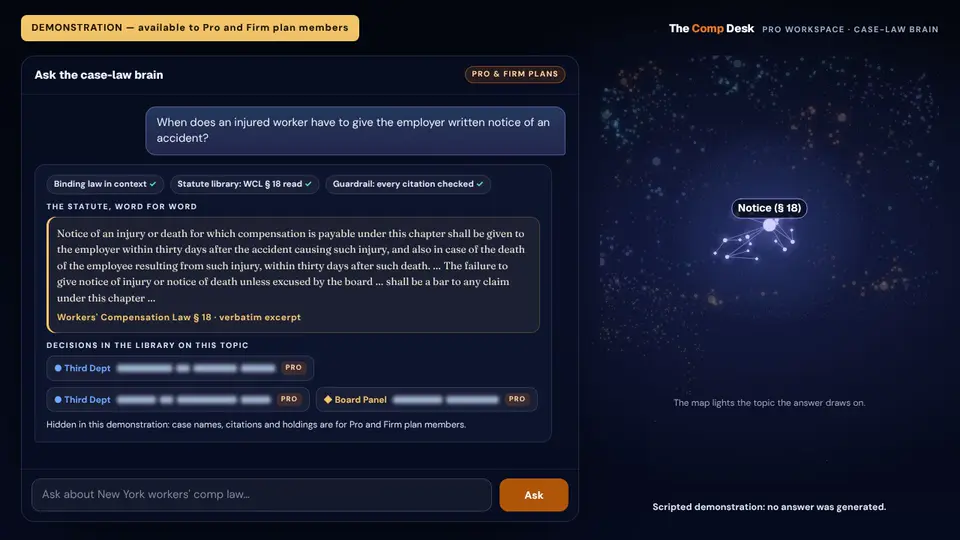
Cites only real cases. Every citation is checked against our verified library of New York decisions before you see it. A case that isn't in the library never reaches you.
Pro is free for now: every Pro tool, no trial, no credit card. · See every feature

In the library: binding Third Department decisions, Full Board decisions (they have the effect of binding WCLJs in cases with similar facts) and persuasive Board Panel decisions on this topic, grouped by sub-issue, with the statutes they turn on.
Answers now for Pro and Firm plan members- A question comes in
- The binding law, already in context
- Board decisions and statutes, looked up
- Every citation checked against the library
- The answer, with its citations
How a question travels through the brain. An illustration: nothing is asked on this page.
Every number from the law's own formula.
One calculation engine runs the Pro Workspace, The Comp Desk app and the calculators on this site. Type the wage and date of injury once: the TT rate, the SLU rate and the statutory maximum and minimum for that date fill in, and every calculator that needs them reads them.
- AWWAverage weekly wage
- $/WKRates by date of injury
- SLUSchedule loss of use
- LWECLoss of wage-earning capacity
- CCPCCP / Award Builder
- S32Section 32 settlement
- ROMROM → SLUBETA
- NSNon-ScheduleBETA
- APPApportionment
- BRNBurns rate
- MTGMedical Treatment Guidelines
- DATEDate calculator
Free on this site, no sign-in: the AWW calculator, maximum rates by year, SLU calculator, LWEC calculator, CCP / award calculator, radiculopathy calculator, settlement calculator and the Medical Treatment Guidelines search.
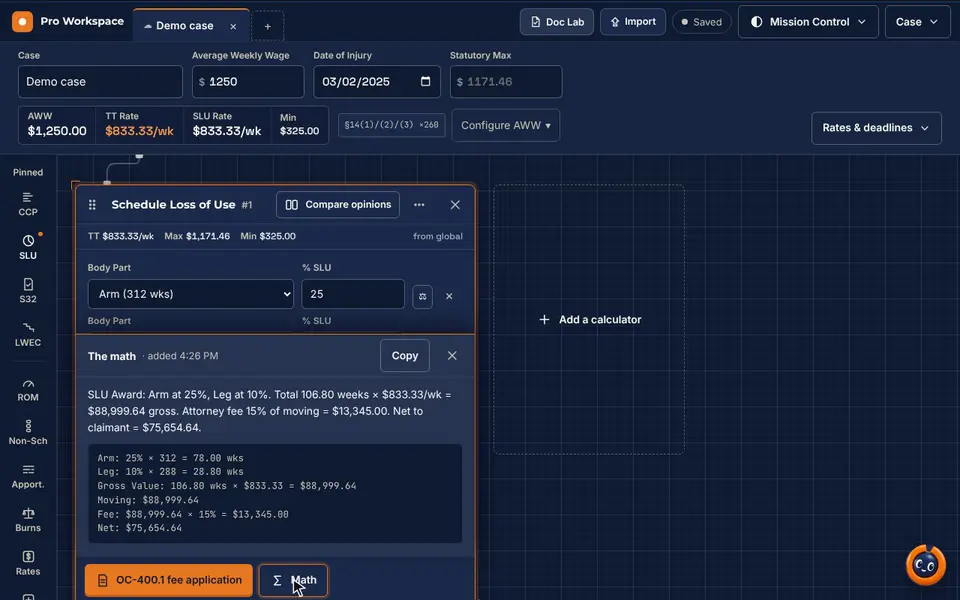
Demo case · the real workspace, recorded with made-up figures
What this recording shows
- A demo case: the average weekly wage and the date of injury go into the case strip, and the TT rate, SLU rate and minimum for that date fill in.
- A Schedule Loss of Use tile: one body part, then a second, each with its percentage.
- The results column adds the weeks, prices them at the SLU rate and shows the award, the 15% fee and the net to the claimant.
The fee application, from the same numbers.
CCP, SLU, Section 32 and LWEC each carry an OC-400.1 fee application button. The filed fee rounds down to the nearest $5, and with prior counsel it requests the current attorney's share.
- Open "Math" on a calculator tile to see the equation behind its result
- Formulas and Copy all equations: every tile's equation in one place, ready to paste
- Split a fee with prior counsel on CCP and SLU; the net to the claimant does not change
A made-up case used to record the demo, not a client result.
Prior results do not guarantee a similar outcome.
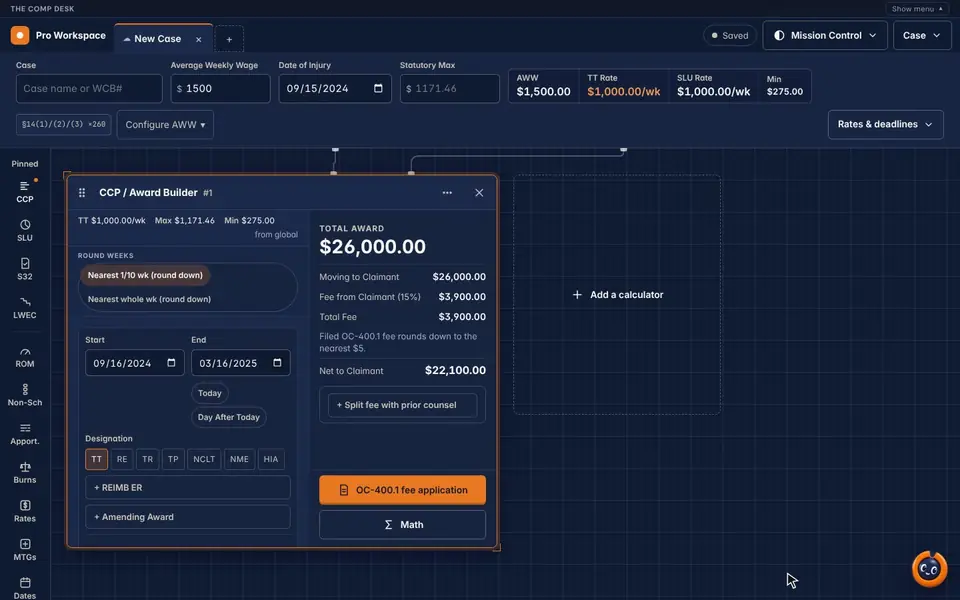
What this recording shows
- A CCP / Award Builder tile with one period, September 16, 2024 to March 16, 2025, designated TT.
- Weeks are rounded to the nearest tenth: 26.0 weeks at $1,000 a week.
- The results column shows a $26,000 award, a $3,900 fee (15%) and $22,100 net to the claimant.
Prep in Claude. Land in your workspace.
Say "Add this week's hearings to my Pro Workspace." Claude sends the cases from your prep, and each one arrives as a finished tab: the wage and date of accident in the case strip, the calculators filled in, and every figure computed by the workspace itself.
- Sign in once with your Comp Desk account and approve one permission: "Add cases to your Pro Workspace"
- That permission cannot read your other tabs, saved cases, account or billing, and it can't change tabs you made
- No Claude? Import → Paste cases takes the same block in the workspace
- Pro and Firm attorney accounts
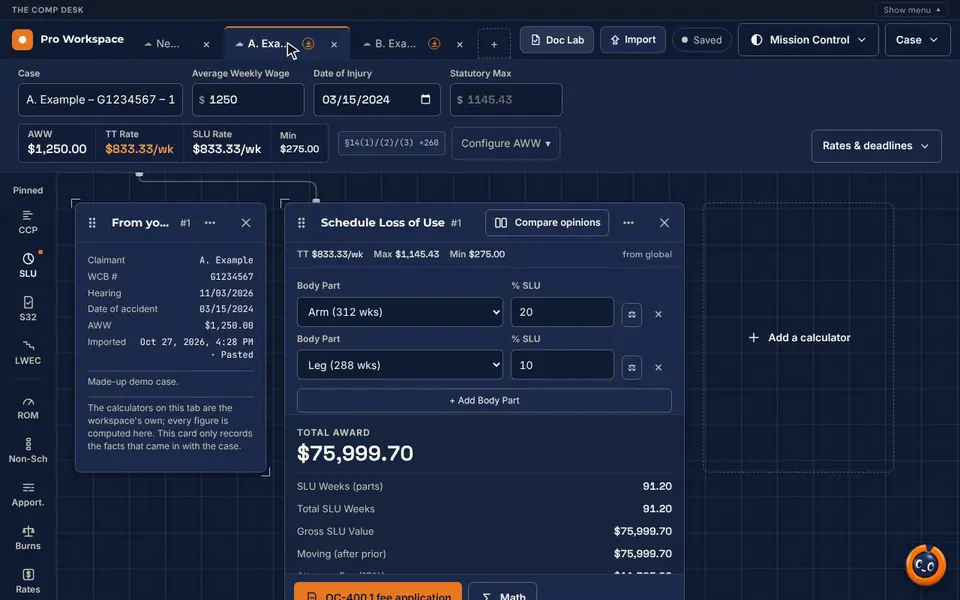
Demo cases · made-up claimants and figures
What this recording shows
- Import cases opens in the Pro Workspace, and a block of made-up cases is pasted in.
- The workspace checks each case and imports it as its own tab, marked Imported.
- An imported tab opens with its case strip and calculators already filled in, and the workspace computes every figure.
Inside Claude, on your phone, in your firm.
The New York State Workers' Compensation Hub
New York Workers' Compensation calculators, rates, forms, the glossary and explainers, case law and a doctor finder, inside your AI assistant. It runs in Claude today, and a ChatGPT listing is in preparation. The calculators and reference tools need no account.
Doc Lab e-sign
Send a prepared Section 32 agreement to your client to e-sign in The Comp Desk app or a phone browser, and follow it from sent to opened, ID verified and signed, to the signed PDF and its certificate of completion.
In the Pro WorkspaceEleven free skills
Free workflow skills that come with the Hub: hearing prep, appeals and rebuttals, Section 32 checks, explaining a benefit to a client in plain language, and more. The drafting skills prepare drafts only. A licensed attorney reviews, edits and signs everything before it is filed or sent.
Say the numbers. Comp Buddy fills the tiles.
Hold the voice button and say what to enter; the workspace fills in the tiles and answers out loud.
Voice controlCalculate on the phone, finish on the computer.
In The Comp Desk app, "Save to my workspace" sends a calculation to the Pro Workspace: it arrives as a saved tab.
Chrome Extension
Highlight a wage statement in an adjuster's email, and the AWW appears in the side panel. It reads only what you highlight.
Your clients' languages, built in.
The Comp Desk app and Comp Buddy's chat work in 12 languages: English, Spanish, Simplified and Traditional Chinese, Russian, Bengali, Haitian Creole, Korean, Arabic, Urdu, French and Polish. Comp Buddy talks out loud in English and Spanish.
This website reads in ten of them. Use the language button at the top of any page.
Agentic case management for New York Workers' Compensation firms.
The Comp Desk Agentic OS is the case management software we're building for claimant-side Workers' Compensation law firms in New York: AI agents that do the reading, the drafting and the chasing at each stage of a case, and a desk you can run by voice. The agents draft; your attorneys and staff approve.
Agents draft. Your staff approve.
No agent files, signs, pays or sends anything on its own. Every draft waits for a person, and an attorney approves anything about medical care, a settlement or a filing.
An agent at every stage of the case
Intake and a draft C-3, hearing prep checklists from the latest notes, a medical report reader for treating and IME reports, OCA-960 records requests, Section 32 closing documents and follow-ups on late reports and unpaid awards.
A desk you can talk to
Ask about tomorrow's hearings out loud and hear the answer. The preview has a real-time voice prototype you can try in your browser, with fictional clients.
Inside Claude and ChatGPT
Work with the firm's cases from Claude or ChatGPT through The Comp Desk connector, with access the firm switches on and controls.
Every item cites its source
A checklist line, a finding or a reply links to the note, report or message it came from.
Each firm kept apart
Your firm's data stays your firm's, and medical information never runs automatically: it stays behind the people allowed to see it.
Built by a New York Workers' Compensation attorney.
I'm Joel Mays, Esq., a New York Workers' Compensation attorney. I've represented thousands of injured New Yorkers before the Workers' Compensation Board. I've seen how fast a claim moves, and how often injured workers are left uninformed and afraid. I've also seen attorneys and their staff without the time or tools to manage a full caseload and keep their clients informed.
I started The Comp Desk to teach New Yorkers their rights and give them the resources to get the benefits the Workers' Compensation Law provides. As it grows, we'll keep adding tools for injured workers and for the professionals who represent them.
Claimant leads, matched to you by county.
Injured workers using Comp Buddy connect with a licensed NYS Workers' Compensation attorney through a neutral, round-robin network. There is no paid placement and no auction: each lead goes to the next attorney in the county's rotation.
- Pay lead generation fees only for leads you accept. No monthly fee and no percentage of your case.
- Round-robin and neutral. Placement is never sold.
- Accept or pass in one tap; expired leads re-route automatically
Pro and Firm plans.
Pro is free for now: every Pro tool, no trial, no credit card. Firm is unchanged.
$0 / month, for now
For the practicing Workers' Compensation attorney.
- All 12 calculators (SLU, AWW, LWEC, radiculopathy, CCP, more)
- Fee Application Equation Generator
- Pro Workspace with case save/sync
- Cited results — every number, every time
- iOS app + web
$99 / month
For practices of 3+ attorneys.
- Everything in Pro, firm-wide
- Unlimited attorney seats
- Litify / Salesforce integration
- Case data export
- Priority support
Agentic AI for Workers' Compensation firms: common questions
What is agentic case management?
Case management in which AI agents take on defined tasks in a case: reading new documents, drafting forms and checklists, and flagging what needs a follow-up, instead of only storing the file. In the Comp Desk Agentic OS, each stage of a New York Workers' Compensation case gets an agent, and every draft waits for a person to approve it.
Do the agents act on their own?
No. The agents draft and your staff approve. No agent files, signs, pays or sends anything on its own, and an attorney approves anything about medical care, a settlement or a filing.
Is the Agentic OS available now?
Not yet. The Agentic OS is in development and is not for sale. The preview shows a prototype with fictional clients, and New York claimant-side firms can email us to join the early-access list for design-partner firms. Availability and details may change.
Is the Agentic OS an AI paralegal?
It is software that prepares first drafts, checklists and summaries for your team to review, much as you might hand a task to a paralegal. It does not give legal advice or decide anything on a case; a licensed attorney stays responsible for the work.
Can I run it by voice?
The preview has a voice prototype you can try in your browser: hold the microphone, ask about tomorrow's hearings, and it answers out loud. It listens and speaks in English for now, uses fictional data, and never records or keeps audio. Today, voice control in the Pro Workspace fills in the calculator tiles as you speak.
Will it work with Claude or ChatGPT?
That is the plan: work with the firm's cases from Claude or ChatGPT through The Comp Desk connector, with access the firm switches on and controls. Today, the New York State Workers' Compensation Hub already brings the calculators, forms and case law into Claude, and Claude can send your hearing prep straight to the Pro Workspace.
What can a Workers' Compensation firm use today?
The Pro Workspace: the SLU, LWEC, AWW and CCP calculators on one calculation engine, the fee application, Doc Lab e-sign, voice control, import from Claude and the case-law brain. These are available now; the Agentic OS is the part still in development.
Is The Comp Desk a law firm?
No. The Comp Desk is a software platform operated by NJJ Document Services, Inc. It is not a law firm and does not provide legal advice, and using it does not create an attorney-client relationship.
Try it on tomorrow's hearing.
Pro is free for now: no trial, no credit card, nothing to cancel.